
Split bill calculator and bill splitter
Split bills online. See who owes whom.
Split equally or by item, with VAT, service charge, and PromptPay QR codes. Free, with no sign-up.
Start your split
Enter the total and split instantly
Use the final bill including tax and service charge. This mode adds no extra charges.
Enter the total and group size to see your split.
Add friends
List everyone in the group, with PromptPay if you want scan-to-pay.
Add items
Enter each item with its price, who paid, and who shared it.
See who pays whom
Get instant settlement results, then share a link or save an image.
Try a bill for 4, with 1 skipping drinks
Split 800 THB of food between 4 and 300 THB of drinks between 3: each drinker pays 300 THB, while the non-drinker pays 200 THB.
Open this example in the food calculatorA split bill calculator for uneven orders
HarnDuay is designed for real-world restaurant checks where one person had extra drinks, another skipped dessert, and someone else paid the whole table first.
Instead of forcing an equal split, it lets you assign each item to the right people so the final total matches what was actually shared.
Useful for food costs, trips, VAT, and group expenses
You can use HarnDuay as a bill splitter for restaurant bills, a food cost sharing calculator for group meals, or an expense split calculator for trips and shared spending.
It also supports VAT 7%, service charge 10%, and PromptPay-friendly settlement summaries for faster payments.
Skip the drinks? Skip that part of the bill.
For a group of four where only three ordered drinks, share the food between all four and select only the three drinkers for the drinks item.
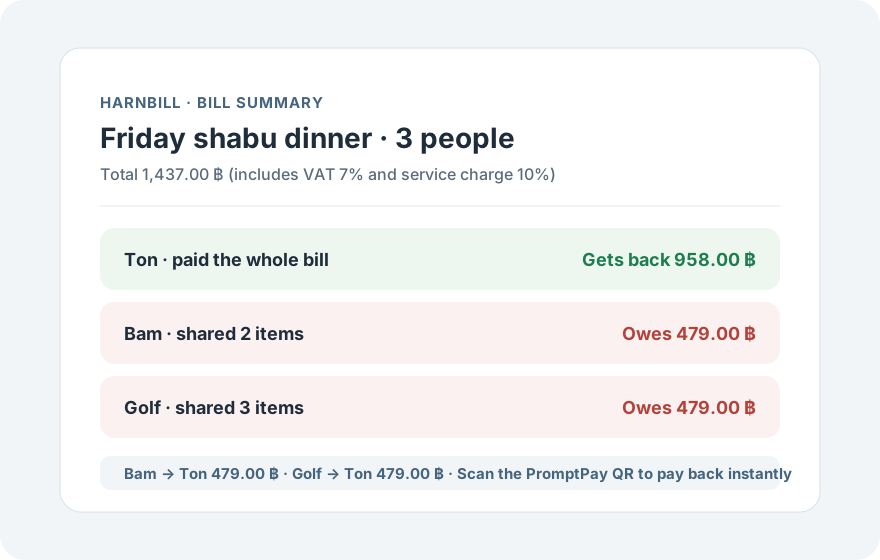
Each person pays for the items they shared, and the person who paid upfront can see how much to collect. The same approach works for desserts and other shared expenses.
Share the summary and collect money back with PromptPay
Once the bill is calculated, you can share a view-only summary link so everyone can verify their own amount, or save the summary as an image for the group chat.
If the person who paid adds their PromptPay number, HarnDuay generates a QR code so friends can scan and transfer exactly what they owe — no typing bank account numbers back and forth.
How to split a bill fairly in 5 steps
- Add everyone in the group, plus the payer's PromptPay number if you want scan-to-pay QR codes.
- Enter each receipt line with its price and quantity.
- Choose who paid for each item and who actually shared it.
- Turn on VAT 7% or service charge 10% if the venue adds them, or override per item.
- Check who owes whom, then share the summary link or save it as an image for the group.
The 7% VAT rate used in this calculator follows the current rate published by the Thai Revenue Department, while the 10% service charge reflects the common rate at restaurants in Thailand.
FAQ
Can HarnDuay split bills when everyone ordered different items?
Yes. You can assign each item to a payer and to the people who actually shared it.
Can I use HarnDuay for travel or group expenses?
Yes. HarnDuay also works for hotels, fuel, transport, tickets, and other shared trip costs.
Does HarnDuay support VAT and service charge?
Yes. It supports both VAT 7% and service charge 10%, including per-item overrides.
Is HarnDuay free? Do I need an account?
Yes, it is completely free. There is no sign-up and no app install — open the site and start splitting on any device.
Does HarnDuay support PromptPay?
Yes. Add the payer's PromptPay number and HarnDuay generates a QR code so friends can scan and transfer their exact share.
Where is my bill data stored?
Calculations run mainly in your browser and no account is required. See the privacy policy page for details.
How do I share the result with friends?
Share a view-only summary link, or save the summary as an image and send it to your group chat.