
VAT calculator
Thai VAT calculator 7% — add or remove VAT from any bill
Add 7% VAT to a pre-tax price or extract VAT from a tax-inclusive total (price × 7 ÷ 107). See pre-tax, VAT, and final totals for Thai restaurant bills, with per-person splitting built in.
VAT calculator
I have the pre-VAT price
- Before VAT
- 0.00 THB
- VAT (7%)
- 0.00 THB
- Total incl. VAT
- 0.00 THB
Calculate VAT and each person's share together
Instead of calculating VAT separately and then splitting the bill, HarnDuay lets you handle both in one flow.
You can see pre-tax totals, VAT per person, and the final total clearly.
Useful for bills with VAT and service charge
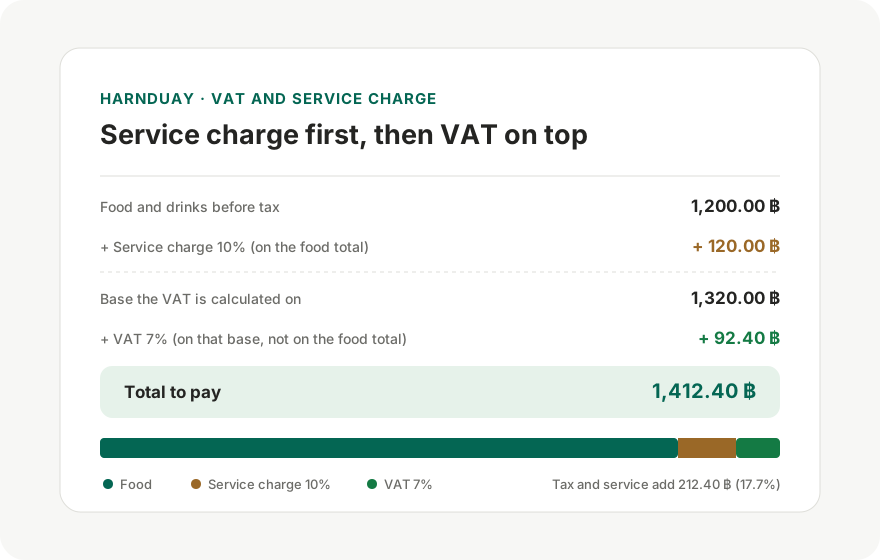
Many Thai restaurant bills include both VAT 7% and service charge 10%, so HarnDuay is built to support both together.
If some items should not include tax or service, you can override them item by item.
How to calculate VAT 7% while splitting the bill
- Add items with their pre-tax prices.
- Enable VAT 7% (already on by default on this page).
- Add the 10% service charge too if the venue charges it.
- Read the pre-tax, VAT, and final totals separately.
- Split the final total across the people who shared each item.
Common mistakes
- Forgetting to separate items some people did not consume, such as desserts, drinks, or add-ons.
- Splitting VAT and service equally even when food totals differ a lot.
- Not marking who paid up front, which causes the reimbursement summary to point to the wrong person.
Tips for faster bill splitting
- Check whether the venue applies VAT only to food or after service charge.
- Use per-item advanced options if some lines should not include VAT or service.
- Share the final link before payment so everyone can verify the numbers first.
FAQ
Can I use HarnDuay as a VAT calculator?
Yes. HarnDuay calculates VAT 7% and shows the final after-tax total each person should pay.
Can I calculate VAT and service charge together?
Yes. It works well for Thai restaurant bills that include both tax and service fees.
Does it show pre-tax and post-tax totals?
Yes. The summary includes subtotal, VAT, service charge, and final total.
How is this different from a normal VAT calculator?
It not only computes VAT, but also distributes VAT and service charge across people and shows who owes whom.
Is it useful for business meal reimbursements?
Yes. The per-person tax breakdown helps when you need pre-tax and post-tax visibility.