
Travel expense sharing
Share travel expenses for group trips
Use this page to split hotels, fuel, food, tickets, and shared trip expenses when different people paid at different times.
Share travel expense
Loading calculator…
Loading calculator…
Loading calculator…
Why travel costs are harder to split
Trips often involve many categories of spending and multiple people paying on different days, from hotels to fuel to snacks.
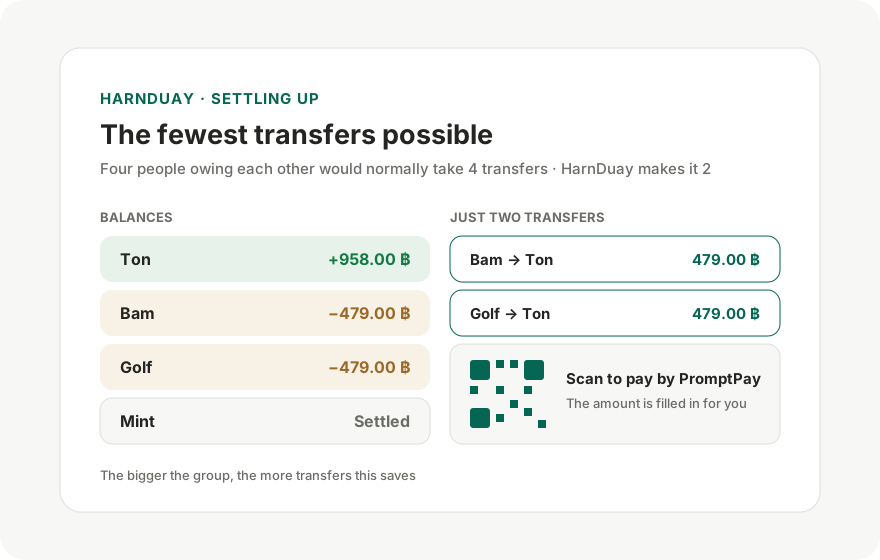
HarnDuay keeps everything in one place and calculates who should reimburse whom at the end.
Useful for short and long trips
You can keep adding expenses as the trip goes on and share the result with the group for review.
That reduces confusion and makes end-of-trip settlement much faster.
How to split trip costs when people pay at different times
- Add every member of the trip.
- Add each expense: accommodation, fuel, food, tickets.
- Mark who paid up front for each expense.
- Assign only the people who shared an expense if some did not join.
- Review the net settlement of who should transfer to whom.
Common mistakes
- Combining the whole trip into one line even though some people skipped parts of the trip.
- Not separating fuel, hotel, and meal costs, which makes review difficult later.
- Failing to record the actual payer for each expense, making settlement confusing.
Tips for faster bill splitting
- Add everyone first, then enter receipt items to reduce backtracking.
- Use the duplicate action when your receipt has several similar lines.
- Combine quantity with split weights when one item has uneven portions.
FAQ
Can I use HarnDuay for group travel expenses?
Yes. It works for hotels, transport, fuel, food, tickets, and any other shared trip cost.
What if some people did not join certain activities?
Assign each expense only to the people who actually shared it, such as the people who stayed in one room or joined one activity.
Can I share the final result with friends?
Yes. HarnDuay can generate a shareable summary so everyone can verify the same totals.
Can I use this for hotels across multiple nights?
Yes. Add each hotel or night as a separate item and assign only the people who actually stayed.
Does it work for fuel and tolls too?
Yes. It is useful for road trips where different friends pay at different stages of the journey.